3 7 月, 2013 () 色彩管理, Fogra › Administrator › 1 Comment
Target: Fogra media wedge CMYK V2

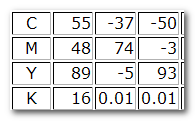
Target Number(Lab):

Display: Asus PA249Q
Calibration tool: ArgyllCMS with DipcalGUI
Profiler tool: ArgyllCMS with DispcalGUI
Verification method
1. Convert the Fogra 39 target lab(Fogra39.txt) to Display RGB
icclu -fb -ia -pl -s 255 display.icc <Fogra39.txt> F39rgb.txt
2. display F39rgb to Firefox browser:
dispread -v -dweb F39rgb
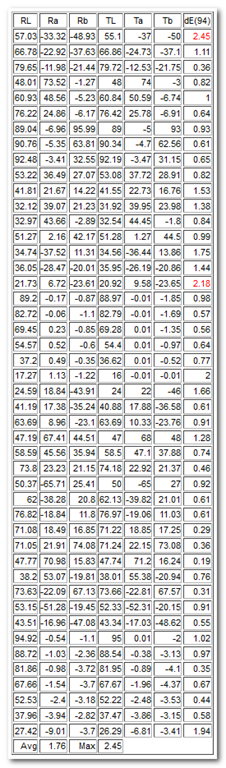
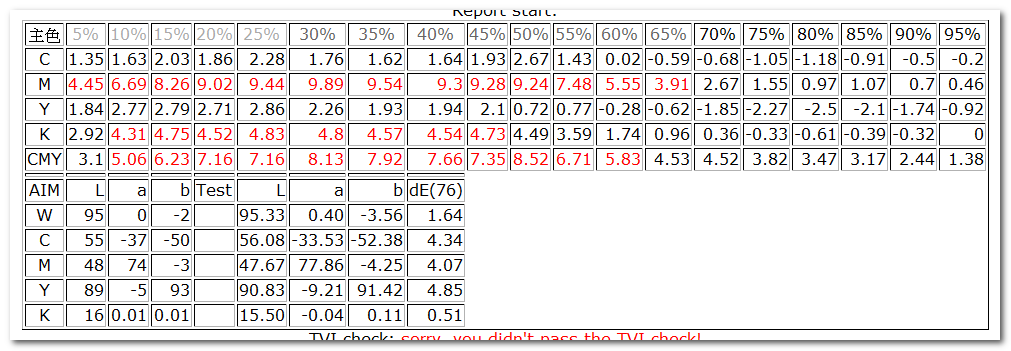
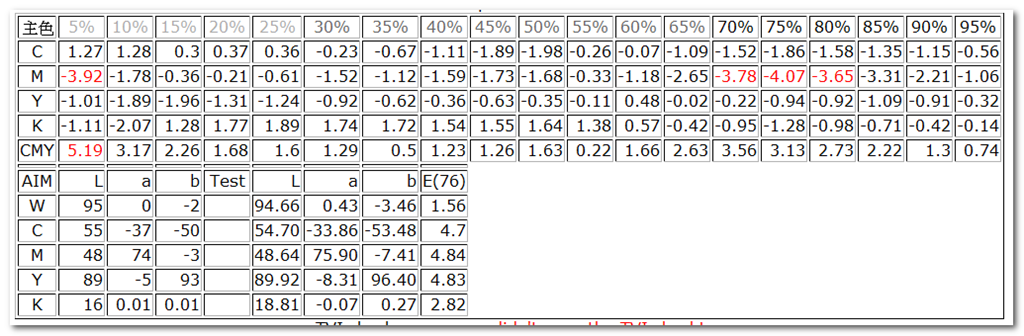
3. iOne reading from Firefox, compare to target lab, and get the report:
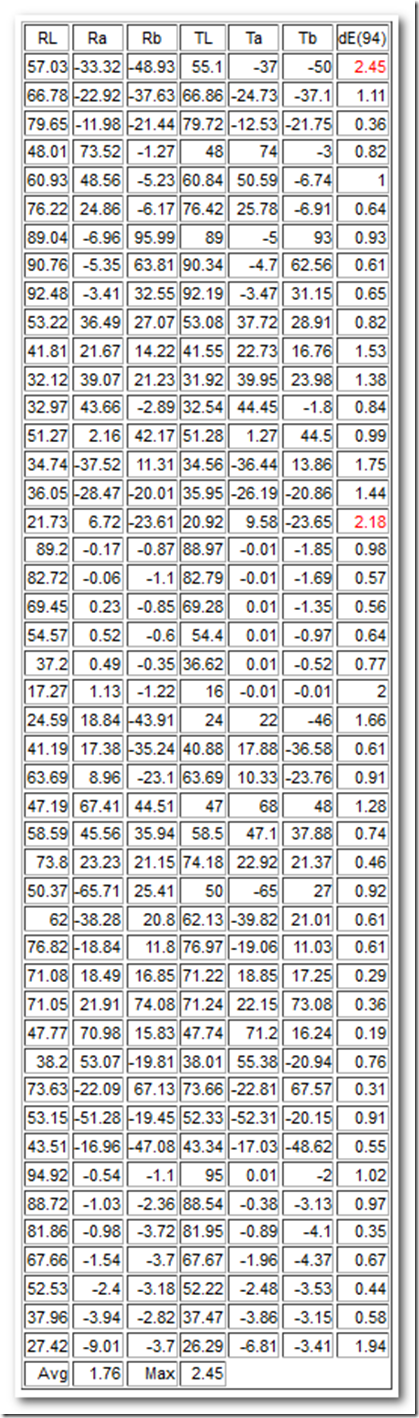
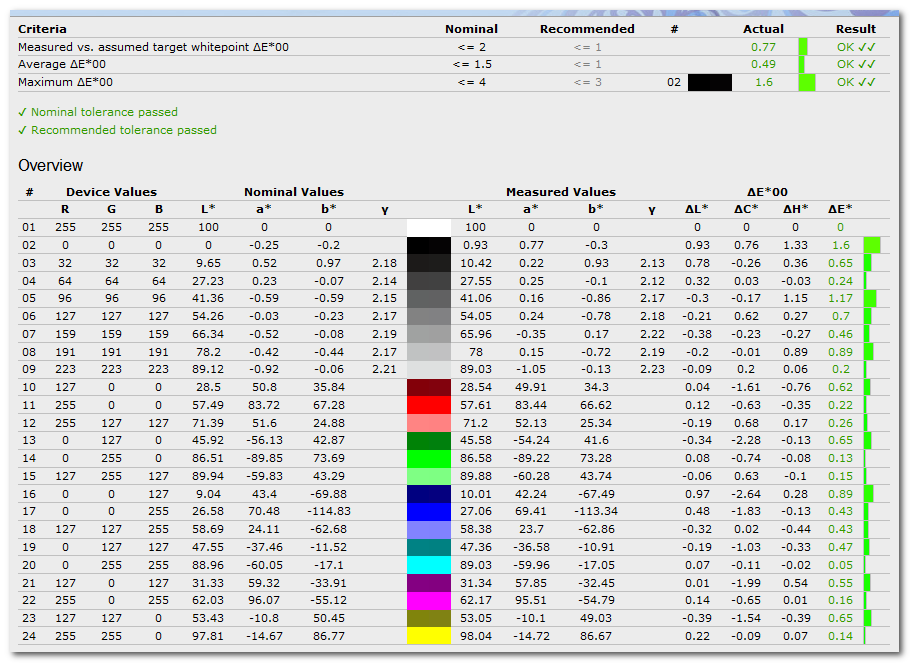
pretty good job for a NTD 16900 display.
compare to a Samsung F2380 here:http://www.fredkuo.idv.tw/wordpress/?p=1523
Filed under: 色彩管理, Fogra › Tags: Asus, Fogra PSO, ISO 12647-2, Samsung, soft proof
4 6 月, 2013 () 色彩管理, Fogra › Administrator › No Comments
兩個重點:
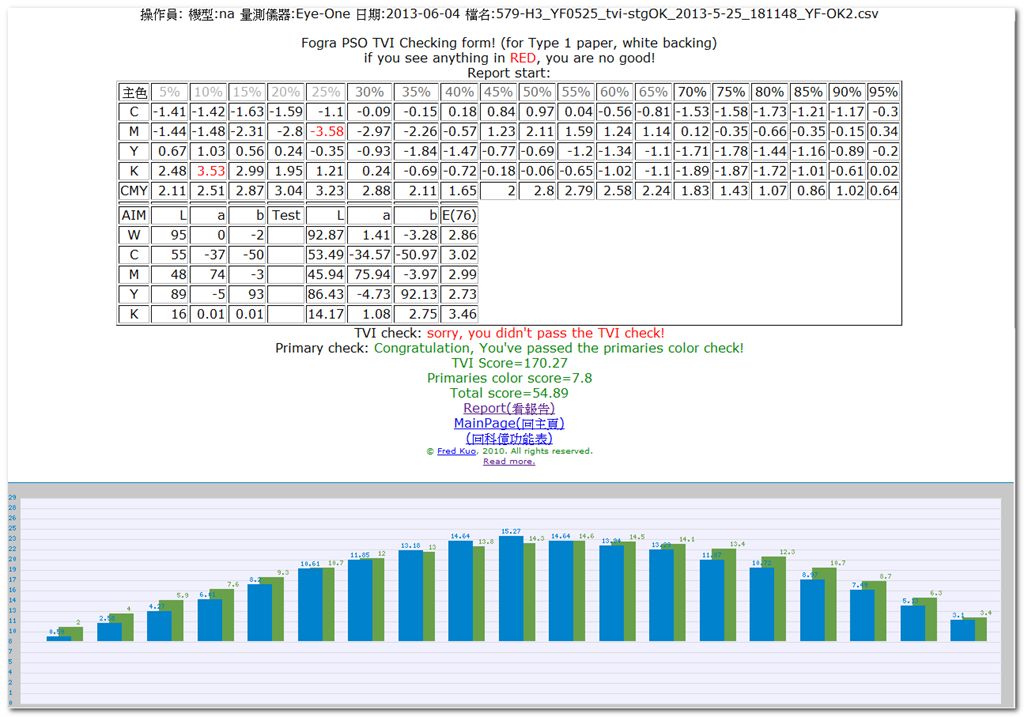
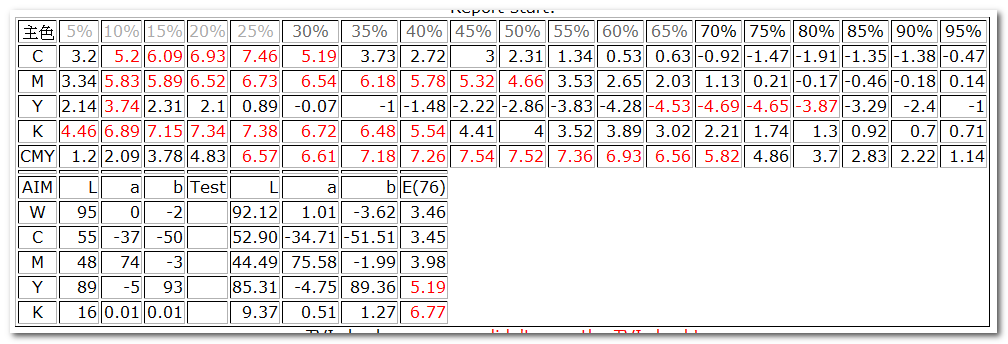
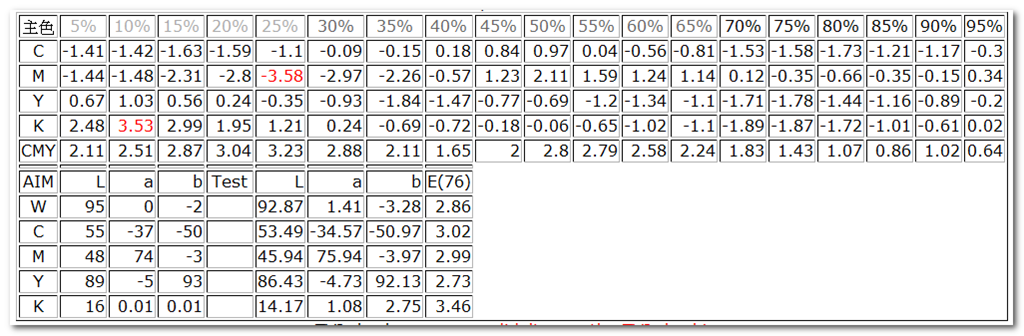
1. 由於 mime 關係, mac users 的 csv 及 windows users 未裝 Excel 的 csv 會被 php reject, 新版本直接取消 mime 檢查。
2. 加入圖形顯示,在操作TVI修正時,反應更直覺。
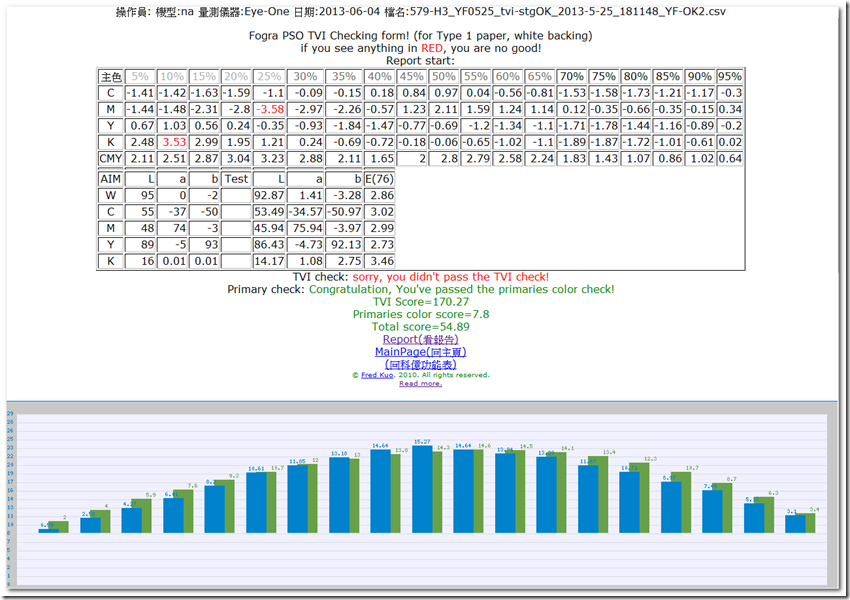
工作網址: http://www.fredkuo.idv.tw/fogratvi/
工作方式請參考:http://www.fredkuo.idv.tw/wordpress/?p=1025
Filed under: 色彩管理, Fogra › Tags: Fogra PSO, ISO 12647-2, TVI
24 4 月, 2013 () 色彩管理, Fogra › Administrator › No Comments
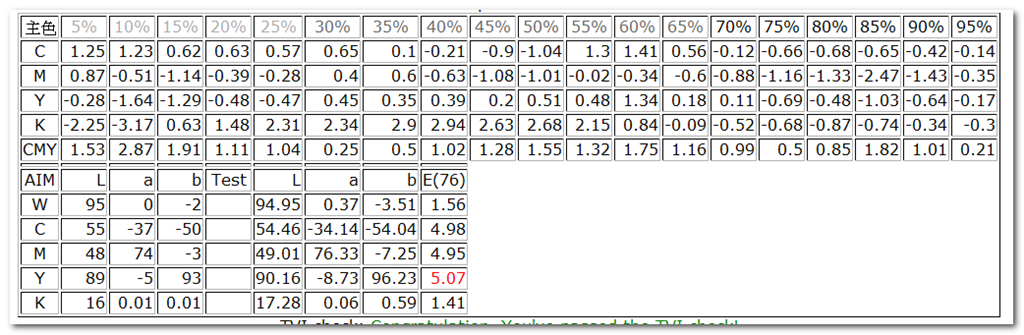
*ISO 12647-2 (type 1 paper , white backing) 到位定義:
1. 紙白到位: 目標值: 95, 0 ,-2 :,寬容值: Delta-E < 3
2. 主色到位 ,目標值如下,寬容值: Delta-E < 5
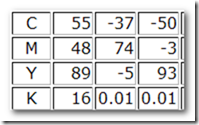

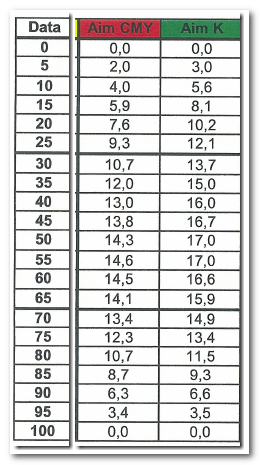
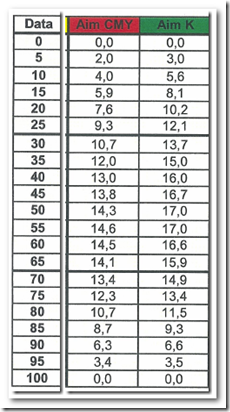
3. TVI 到位;目標值如下,寬容值: 5%~25% +- 3%, 30%~65% +-4%,65%~95% +-3%。
4 CMY spread 到位: CMY TVI 差異<3。
======================================================================================================
廠家編號MJ1303, ISO 12647-2 數據到位紀事。
0. 0318 兩個小時課程; 觀念到位 。
1. 0326 第一次上機
a. 主色到位;工具: iOne+KeyWizard+Excel, CMY 色差均落在 4 的邊緣,勉強到位。
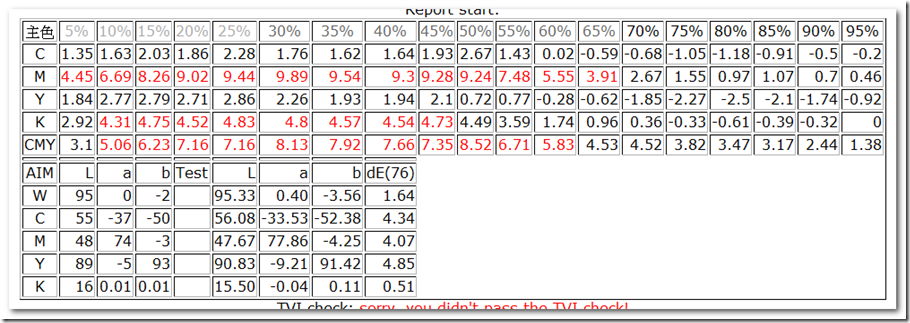
b. 第一次TVI數據分析;工具: iOne+Colorport+php;取得數據如下,CY 版 TVI 到位,MK版 TVI 修正值如下。
2. 0412 :1535 第二次上機
TVI 第一次修正,主色勉強到位,TVI 大致到位。準備做第二次TVI修正。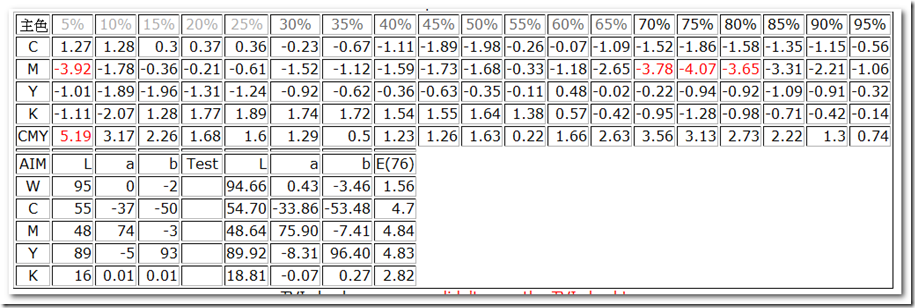
0412 :1713 TVI第二次修正,第三次上機
主色勉強到位,TVI 到位,CMY spread 到位, ISO 12647-2 第一類紙到位。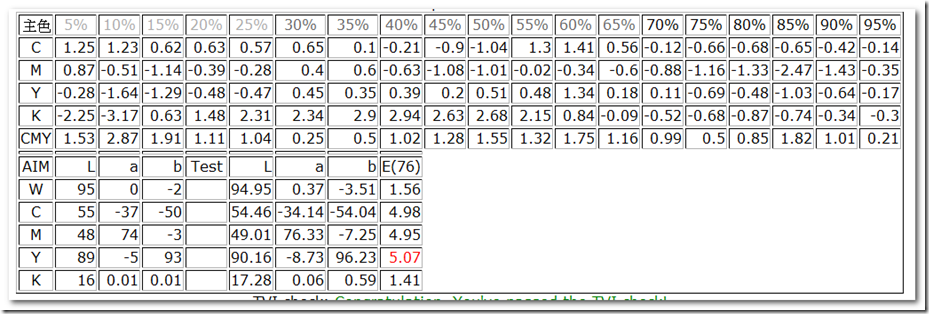
廠家編號MJ1303 ISO 12647-2 數據到位總工作時間:
觀念到位:課程約兩個鐘頭。
機器到位: TVI 修正兩次,上機三次,共約8個小時。
工具參考 :http://www.fredkuo.idv.tw/wordpress/?p=1025&cpage=1#comment-3684
Filed under: 色彩管理, Fogra › Tags: Fogra PSO, ISO 12647-2, print by number, TVI
8 2 月, 2013 () 色彩管理, Fogra › Administrator › 2 Comments
WYSIWYG (What You See Is What You Get) is terminology that dated like 15 years ago when DTP just started. nothing new about it, but I haven’t seen anyone demonstrate the terminology in a more explicit way::by Number. So, here we are:
1. what you see on the LCD display (by Number via iOne) :
a. LCD (a Samsung F2830) Display calibration quality: 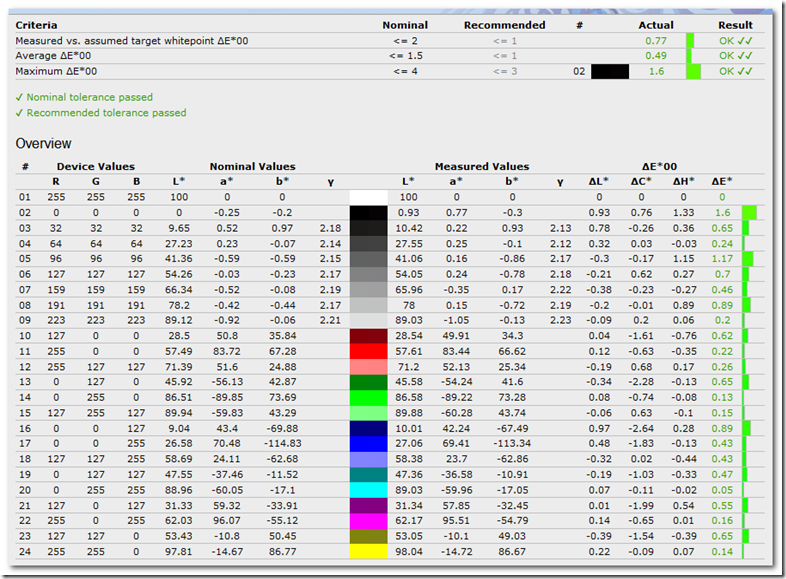
b. What you see of the Fogra CMYK media wedge V2 after calibration (by number via iOne)
| 55.1 |
-37 |
-50 |
61.53 |
-23.67 |
-47.23 |
15.06 |
|
|
| 66.86 |
-24.73 |
-37.1 |
66.24 |
-25.22 |
-39.65 |
2.67 |
|
|
| 79.72 |
-12.53 |
-21.75 |
79.31 |
-12.89 |
-22.63 |
1.04 |
|
|
| 48 |
74 |
-3 |
48.99 |
75.87 |
-2.34 |
2.22 |
|
|
| 60.84 |
50.59 |
-6.74 |
60.12 |
52.23 |
-6.12 |
1.90 |
|
|
| 76.42 |
25.78 |
-6.91 |
75.99 |
26.46 |
-7.5 |
1.00 |
|
|
| 89 |
-5 |
93 |
92.52 |
-8.88 |
81.95 |
12.23 |
|
|
| 90.34 |
-4.7 |
62.56 |
90.19 |
-5.19 |
63.64 |
1.20 |
|
|
| 92.19 |
-3.47 |
31.15 |
92.61 |
-4.01 |
33.3 |
2.26 |
|
|
| 53.08 |
37.72 |
28.91 |
51.59 |
38.71 |
26.03 |
3.39 |
|
|
| 41.55 |
22.73 |
16.76 |
39.66 |
22.77 |
14.22 |
3.17 |
|
|
| 31.92 |
39.95 |
23.98 |
29.36 |
40.68 |
26.04 |
3.37 |
|
|
| 32.54 |
44.45 |
-1.8 |
30.6 |
45.06 |
-3.94 |
2.95 |
|
|
| 51.28 |
1.27 |
44.5 |
49.78 |
1.72 |
46.58 |
2.60 |
|
|
| 34.56 |
-36.44 |
13.86 |
33.58 |
-36.73 |
12.11 |
2.03 |
|
|
| 35.95 |
-26.19 |
-20.86 |
35.95 |
-23.43 |
-20.53 |
2.78 |
|
|
| 20.92 |
9.58 |
-23.65 |
20 |
5.81 |
-24.42 |
3.96 |
|
|
| 88.97 |
0 |
-1.85 |
89.24 |
-0.02 |
-1.88 |
0.27 |
|
|
| 82.79 |
0 |
-1.69 |
82.49 |
-0.23 |
-1.96 |
0.46 |
|
|
| 69.28 |
0 |
-1.35 |
68.89 |
-0.24 |
-1.32 |
0.46 |
|
|
| 54.4 |
0 |
-0.97 |
53.62 |
-0.44 |
-0.78 |
0.92 |
|
|
| 36.62 |
0 |
-0.52 |
35.54 |
0.6 |
-0.74 |
1.25 |
|
|
| 16 |
0 |
0 |
15.56 |
-1.4 |
0.02 |
1.47 |
|
|
| 24 |
22 |
-46 |
22.07 |
19 |
-46.59 |
3.62 |
|
|
| 40.88 |
17.88 |
-36.58 |
39.69 |
17.43 |
-35.8 |
1.49 |
|
|
| 63.69 |
10.33 |
-23.76 |
62.96 |
11.11 |
-25.86 |
2.36 |
|
|
| 47 |
68 |
48 |
47.21 |
70.31 |
50.41 |
3.34 |
|
|
| 58.5 |
47.1 |
37.88 |
57.69 |
49.04 |
37.51 |
2.13 |
|
|
| 74.18 |
22.92 |
21.37 |
73.6 |
23.73 |
21.72 |
1.06 |
|
|
| 50 |
-65 |
27 |
52.63 |
-55.61 |
27.92 |
9.79 |
|
|
| 62.13 |
-39.82 |
21.01 |
61.37 |
-41.65 |
21.51 |
2.04 |
|
|
| 76.97 |
-19.06 |
11.03 |
76.5 |
-20.29 |
11.79 |
1.52 |
|
|
| 71.22 |
18.85 |
17.25 |
70.79 |
19.28 |
17.67 |
0.74 |
|
|
| 71.24 |
22.15 |
73.08 |
72.67 |
23 |
67.51 |
5.81 |
|
|
| 47.74 |
71.2 |
16.24 |
48.56 |
73.61 |
16.17 |
2.55 |
|
|
| 38.01 |
55.38 |
-20.94 |
35.54 |
56.98 |
-21.89 |
3.09 |
|
|
| 73.66 |
-22.81 |
67.57 |
74.46 |
-23.42 |
65 |
2.76 |
|
|
| 52.33 |
-52.31 |
-20.15 |
57.37 |
-39.06 |
-17.78 |
14.37 |
|
|
| 43.34 |
-17.03 |
-48.62 |
45.85 |
-11.4 |
-47.6 |
6.25 |
|
|
| 95 |
0 |
-2 |
95.08 |
-0.02 |
-1.75 |
0.26 |
|
|
| 88.54 |
-0.38 |
-3.13 |
88.62 |
-0.64 |
-3.52 |
0.48 |
|
|
| 81.95 |
-0.89 |
-4.1 |
81.74 |
-1.33 |
-4.45 |
0.60 |
|
|
| 67.67 |
-1.96 |
-4.37 |
67.04 |
-1.54 |
-5.03 |
1.00 |
|
|
| 52.22 |
-2.48 |
-3.53 |
51.09 |
-1.64 |
-4.51 |
1.72 |
|
|
| 37.47 |
-3.86 |
-3.15 |
36.2 |
-3.78 |
-3.64 |
1.36 |
|
|
| 26.29 |
-6.81 |
-3.41 |
25.51 |
-10.24 |
-3.93 |
3.56 |
|
|
|
|
|
|
|
Max |
15.06 |
Average |
3.06 |
|
|
|
|
|
90% percentile |
6.03 |
|
1.93 |
I got maximum delta-E of 15.06 and Average delta-E of 3.06, If I exclude out the most saturate patches (90% percentile), I got maximum delta-E of 6.03 and Average delta-E of 1.93.
2. What you get from a Epson 9890 print out (by Number via iOne).
| 55.1 |
-37 |
-50 |
54.25 |
-37.9 |
-49.68 |
1.28 |
|
|
| 66.86 |
-24.73 |
-37.1 |
65.37 |
-25.53 |
-36.45 |
1.81 |
|
|
| 79.72 |
-12.53 |
-21.75 |
77.48 |
-14.29 |
-21.43 |
2.87 |
|
|
| 48 |
74 |
-3 |
47.89 |
73.76 |
-2.52 |
0.55 |
|
|
| 60.84 |
50.59 |
-6.74 |
60.46 |
49.74 |
-7.14 |
1.01 |
|
|
| 76.42 |
25.78 |
-6.91 |
75.88 |
26.8 |
-7.46 |
1.28 |
|
|
| 89 |
-5 |
93 |
87.94 |
-5.88 |
91.97 |
1.72 |
|
|
| 90.34 |
-4.7 |
62.56 |
88.94 |
-5.88 |
62.13 |
1.88 |
|
|
| 92.19 |
-3.47 |
31.15 |
92.03 |
-5.28 |
30.1 |
2.10 |
|
|
| 53.08 |
37.72 |
28.91 |
52.6 |
36.5 |
26.48 |
2.76 |
|
|
| 41.55 |
22.73 |
16.76 |
40.54 |
18.07 |
13.17 |
5.97 |
|
|
| 31.92 |
39.95 |
23.98 |
31.85 |
39.51 |
23.73 |
0.51 |
|
|
| 32.54 |
44.45 |
-1.8 |
32.38 |
43.1 |
-4.46 |
2.99 |
|
|
| 51.28 |
1.27 |
44.5 |
49.46 |
-3.63 |
40.45 |
6.61 |
|
|
| 34.56 |
-36.44 |
13.86 |
33.66 |
-38.27 |
12.87 |
2.27 |
|
|
| 35.95 |
-26.19 |
-20.86 |
35.79 |
-26.74 |
-21.73 |
1.04 |
|
|
| 20.92 |
9.58 |
-23.65 |
21.54 |
7.83 |
-24.51 |
2.05 |
|
|
| 88.97 |
0 |
-1.85 |
89.15 |
-0.2 |
-2.69 |
0.88 |
|
|
| 82.79 |
0 |
-1.69 |
83.31 |
0.85 |
-2.95 |
1.61 |
|
|
| 69.28 |
0 |
-1.35 |
68.26 |
-1.95 |
-4.77 |
4.07 |
|
|
| 54.4 |
0 |
-0.97 |
52.93 |
-1.89 |
-3.62 |
3.57 |
|
|
| 36.62 |
0 |
-0.52 |
36.51 |
-1.25 |
-2.84 |
2.64 |
|
|
| 16 |
0 |
0 |
15.68 |
-0.82 |
-0.12 |
0.89 |
|
|
| 24 |
22 |
-46 |
22.59 |
21.31 |
-47.68 |
2.30 |
|
|
| 40.88 |
17.88 |
-36.58 |
39.7 |
16.03 |
-37.96 |
2.59 |
|
|
| 63.69 |
10.33 |
-23.76 |
62.7 |
9.57 |
-24.51 |
1.46 |
|
|
| 47 |
68 |
48 |
46.85 |
67.85 |
48.11 |
0.24 |
|
|
| 58.5 |
47.1 |
37.88 |
58.89 |
48.03 |
37.69 |
1.03 |
|
|
| 74.18 |
22.92 |
21.37 |
73.83 |
23.98 |
21.13 |
1.14 |
|
|
| 50 |
-65 |
27 |
49.95 |
-65.96 |
26.42 |
1.12 |
|
|
| 62.13 |
-39.82 |
21.01 |
61.29 |
-41.39 |
19.67 |
2.23 |
|
|
| 76.97 |
-19.06 |
11.03 |
75.96 |
-19.8 |
8.83 |
2.53 |
|
|
| 71.22 |
18.85 |
17.25 |
70.75 |
18.95 |
15.77 |
1.56 |
|
|
| 71.24 |
22.15 |
73.08 |
71.53 |
24.21 |
72.77 |
2.10 |
|
|
| 47.74 |
71.2 |
16.24 |
47.8 |
71.55 |
16.76 |
0.63 |
|
|
| 38.01 |
55.38 |
-20.94 |
38.05 |
54.24 |
-21.74 |
1.39 |
|
|
| 73.66 |
-22.81 |
67.57 |
72.84 |
-24.75 |
65.25 |
3.13 |
|
|
| 52.33 |
-52.31 |
-20.15 |
52.04 |
-53.1 |
-22.28 |
2.29 |
|
|
| 43.34 |
-17.03 |
-48.62 |
43.01 |
-16.97 |
-49.45 |
0.90 |
|
|
| 95 |
0 |
-2 |
94.04 |
0.14 |
-0.26 |
1.99 |
|
|
| 88.54 |
-0.38 |
-3.13 |
88.27 |
-0.83 |
-4.26 |
1.25 |
|
|
| 81.95 |
-0.89 |
-4.1 |
82.12 |
-0.42 |
-4.83 |
0.88 |
|
|
| 67.67 |
-1.96 |
-4.37 |
66.88 |
-2.56 |
-6.54 |
2.39 |
|
|
| 52.22 |
-2.48 |
-3.53 |
51.27 |
-3.62 |
-5.77 |
2.69 |
|
|
| 37.47 |
-3.86 |
-3.15 |
36.05 |
-4.37 |
-5.28 |
2.61 |
|
|
| 26.29 |
-6.81 |
-3.41 |
24.11 |
-7.38 |
-4.46 |
2.49 |
|
|
|
|
|
|
|
Max |
6.61 |
Average |
2.03 |
|
|
|
|
|
90% percentile |
3.06 |
|
2.10 |
I got maximum delta-E of 6.61 and Average delta-E of 2.03, If I exclude out the most saturate patches (90% percentile), I got maximum delta-E of 3.06 and Average delta-E of 2.10.
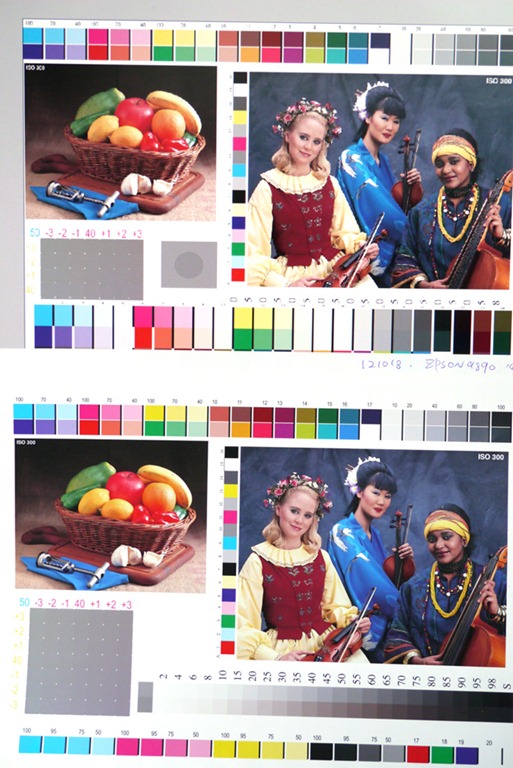
How it looks from the camera (through a Panasonic GX1, White point set at 5000K), light source as here.
LCD on the top and printout at the bottom.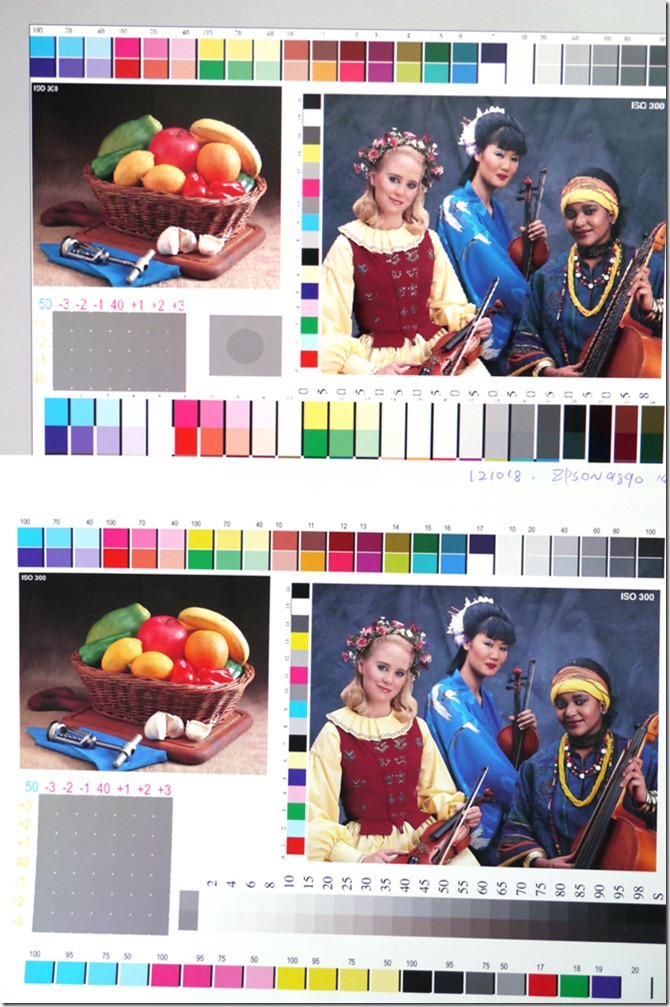
Comment:
The system works, I could keep the Samsung in an accurate position for the 90% percentile (of average 1.93), the most saturate part is just out of its capability.
As for WYSIWYG from LCD to printout, acceptable, there is always leeway to fine tune.
n
Filed under: 色彩管理, Fogra › Tags: ArgyllCMS, Color management system, dispcalgui, Fogra, Media wedge, soft proof
31 1 月, 2013 () 色彩管理 › Administrator › 1 Comment
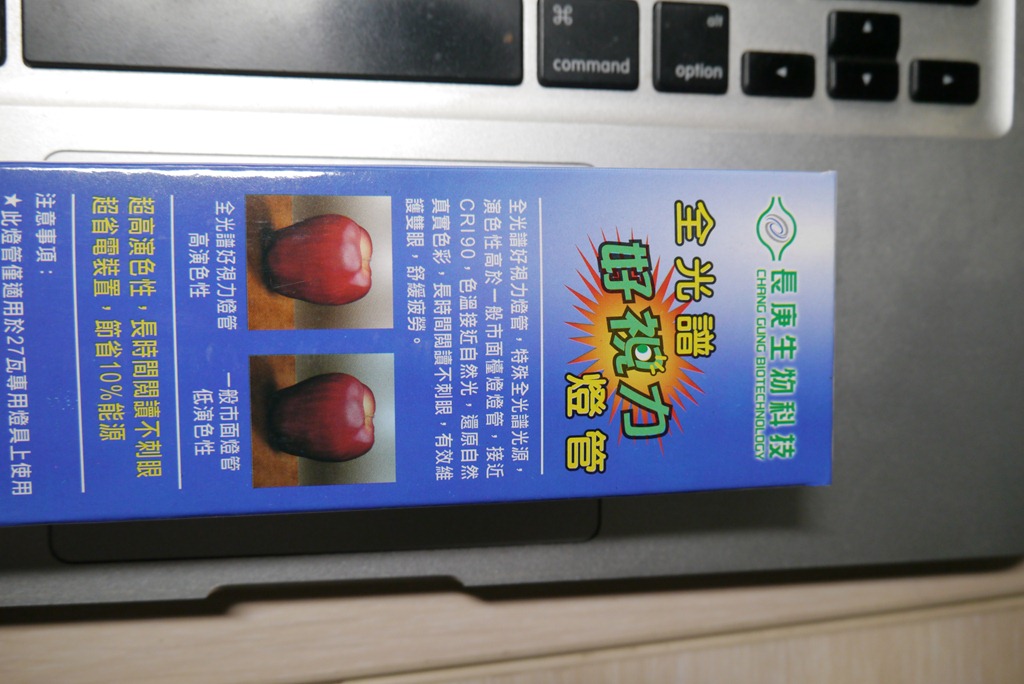
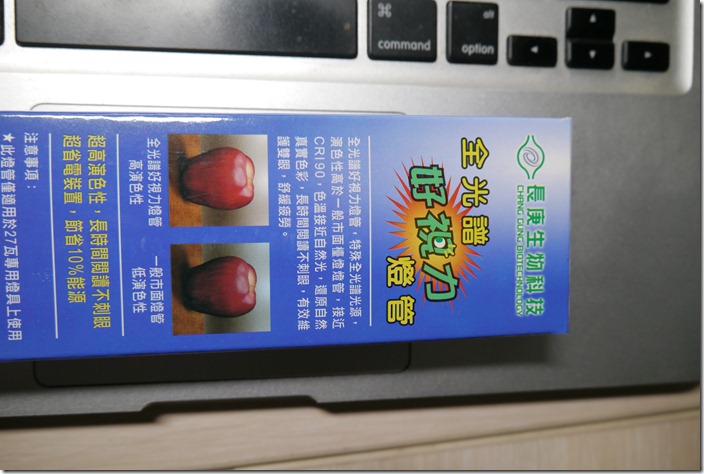
之前2011三月 24t發表過光源篇,當中的長庚生技全光譜燈管已經壽終正寢,算算也用了將近兩年。
再去買了一支新燈管,當然也要收一下數據,順便觀察一下產品的穩定性:
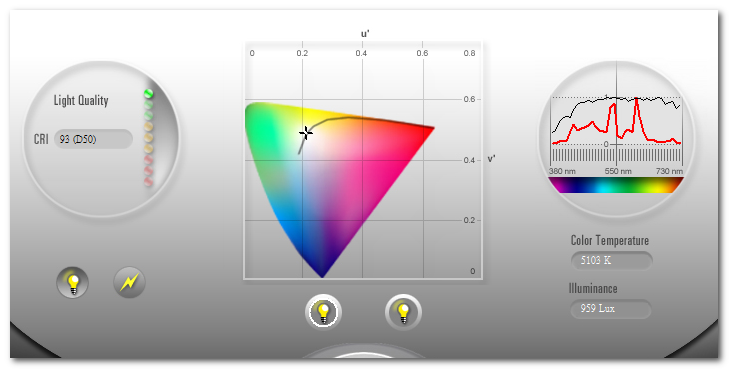
舊數據: CRI:92 色溫: 4581
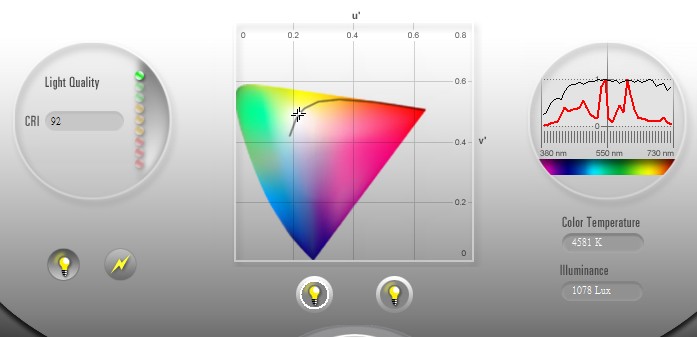
新數據: CRI:93 色溫: 5108
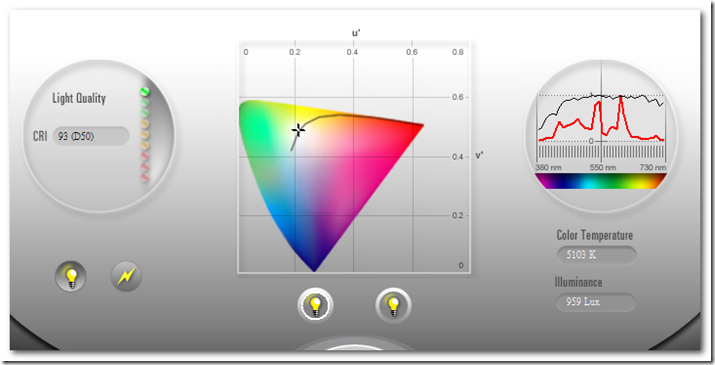
CRI 依然維持在 90 以上;色溫更接近5000K但比上次多了約500度K!?
NT199的東西,CRI維持在 90 以上,演色性算夠好了;繼續使用,找時間再來做一次WYSIWYG的演練。
Filed under: 色彩管理 › Tags: 色彩管理
18 10 月, 2012 () 色彩管理, Fogra › Administrator › No Comments
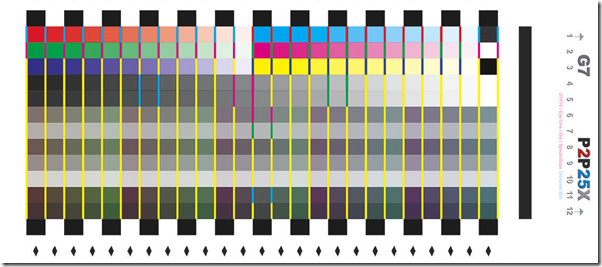
之前寫過一個Fogra TVI 練習工具,這次在做完G7後也比照相同概念做一個G7方式的練習工具。
首先,G7 用的是P2P導表 :
Read the rest of this entry »
Filed under: 色彩管理, Fogra › Tags: 色彩管理, Fogra, G7, idealliance g7, ISO 12647-2, print by number, 印刷, 印刷標準化
5 10 月, 2012 () 色彩管理, Fogra › Administrator › 1 Comment

ps1. Fogra PSO 已於 2011/12 到期,自今年(2012)起沒有任何台灣廠商列入Fogra 有效名單。
ps2. G7是資格書,非認證書(Certificate of Qualification)。 Fogra PSO 為ISO 12647 certified .
ps3. 印刷目標值(color data set): G7為Gracol 2006 coated1v2, Fogra 為 ISO coated v2_eci (Fogra 39)
Read the rest of this entry »
Filed under: 色彩管理, Fogra › Tags: 色彩管理, 認證, Fogra, G7, idealliance g7, ISO 12647-2, PSO, TVI, 印刷, 印刷標準化
14 9 月, 2012 () 色彩管理, Fogra › Administrator › 17 Comments
三年前做完 Fogra PSO 後,在多項品質檢討的回應中,如:打樣比較好跟,印得比以前好看,印得比別人好看…這些都可以理解:印刷機與噴墨印表機都進入同一個規範,數位樣自然好跟;Fogra的調子也確實比以前要好看。其中有一項回應是:印前被要求修色的工作減少了許多;關於這點,我想既然印得比以前好看,被要求修色自然就少了,但心裡總覺得哪裡有點怪,總覺得哪一個邏輯環節沒有連起來;以前印前常被客戶要求修色自然是顏色與客戶預期不合;那做完 Fogra PSO 後就會符合客戶預期嗎?
最近在帶一家廠的標準化,用的是Fogra PSO的方法,起初這條Fogra曲線只是做測試與評估,廠裡用了多年的曲線也不敢一下就換掉,就在一次印前部門不斷的被要求修色的印件中,印前部門索性將還在評估階段的Fogra 曲線拿上來用,結果,神奇的,就OK了,不用再修了!
這個情況讓我再次想起三年前那個讓我覺得邏輯不夠完整的回應:修色工作減少了!
印得好看確實可增加客戶或業務的滿意度而減少修色工作,但色彩預期不應只有”好看”,還必須”正確”;Fogra 方式也可以滿足色彩正確的預期嗎?
Read the rest of this entry »
Filed under: 色彩管理, Fogra › Tags: Adobe CS, 色彩管理, Fogra, G7, idealliance g7, Japan color, print by number, PSO, 印刷, 印刷標準化
5 9 月, 2012 () 色彩管理, Fogra › Administrator › 2 Comments
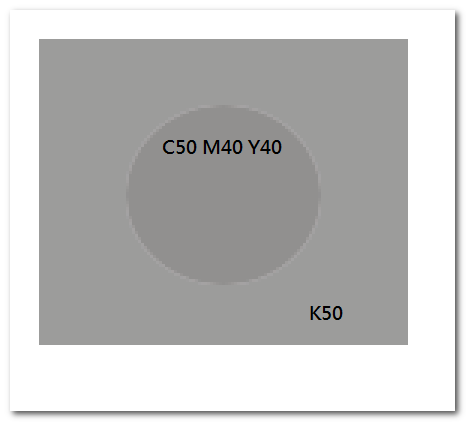
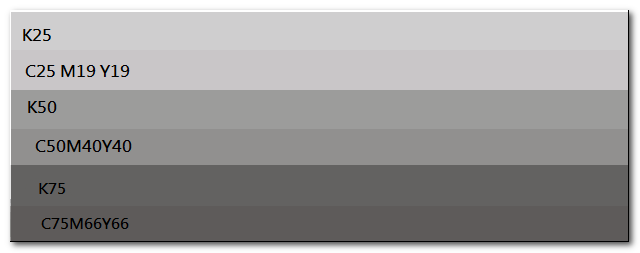
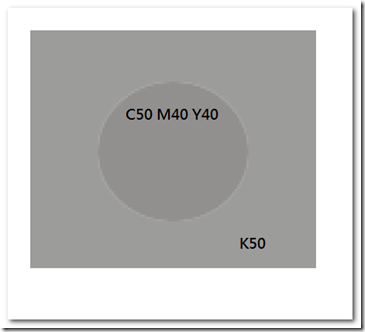
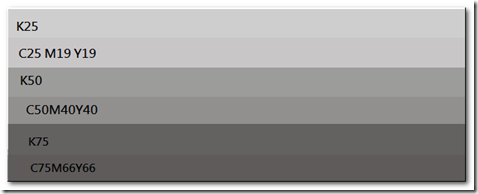
G7提出一種以目視灰色色塊的方法來快速判定當時的印機狀態,組成原理為將CMY組成的灰色色塊緊鄰在相近的K色塊旁邊,如下圖;將CMY50,40,40放在K50旁邊,理論上兩個色塊顏色接近,在視覺上會融在一起,若兩個色塊視覺上差異太大,即表示印機狀態已偏離正常;G7 發布的工具即指定CMY50,40,40與K50為中間灰色(mid-tone gray)的辨識組合,但在我們的實際生產狀態下(已通過G7資格認證),CMY50,40,40與K50的組合就已經有3.33個delta-E的差距;為求這個工具更具代表性,我們利用 G7 提供的Gray finder 工具找出了在CMY50,40,36的組合下,與K50的色差為0.98;所以,在我們的實際生產狀態下,CMY50,40,36與K50的辨識組合會是更具代表性的灰色目視工具。依相同方式,K25與K75的相對組合為CMY 25,19,28 與 CMY 75,66,65。
 Read the rest of this entry »
Filed under: 色彩管理, Fogra › Tags: 色彩管理, G7, idealliance g7, print by number, 印刷, 印刷標準化